Managing Your Context Window with Agents
Share on LinkedInMost people discover agents because of speed. Parallel subagents are faster than sequential ones. That’s real, and it’s a good reason to use them. But speed is a side effect. The bigger gain is what agents keep out of your main session.
Context windows are a resource. Every AI session has one: a limit on how much the model can hold at once, and a cost attached to every token inside it. When you run complex, multi-step work in a single session, that context fills up with intermediate output: raw query results, execution traces, data the model processed three steps ago that isn’t relevant now. The model carries all of it. Responses get slower. Costs climb. And eventually, you hit the limit before the work is done.
Parallel agents solve this at the architecture level. Each subagent gets its own context window. The raw work stays there. The main session only receives what you actually needed: the final output.
I’ve been building a personal health data warehouse using Claude Code, not a dashboard, but a full data pipeline: imports from multiple devices, SQL queries, trend analysis, weekly reviews. The kind of project where you’re pulling from several data sources, applying domain-specific logic, and generating a structured report you actually want to read.
For a while, I ran the weekly review as one long sequential session. Claude would pull sleep data, then fitness, then nutrition, then cardiovascular trends, one after another in the same conversation. It worked. But it was slow, the session got cluttered with raw query output, and if I wanted to check just one area mid-week, I had to re-derive the whole thing or explain what I needed from scratch.
The better approach was sitting right there: build specialized agents for each domain, run them in parallel, and keep the main session for synthesis.
What’s a context window?
Before getting into the architecture, a quick framing note. Every Claude session has a context window: the working memory of that conversation. Everything in the session takes up space: your messages, Claude’s responses, tool output, raw data returned from queries. When a session gets large, you get slower responses, higher costs, and a model that’s trying to synthesize against a wall of intermediate output rather than a clean, focused input.
Subagents each get their own context window. That’s the key. Work that happens in a subagent stays there. Only the final output comes back to you.
The Architecture
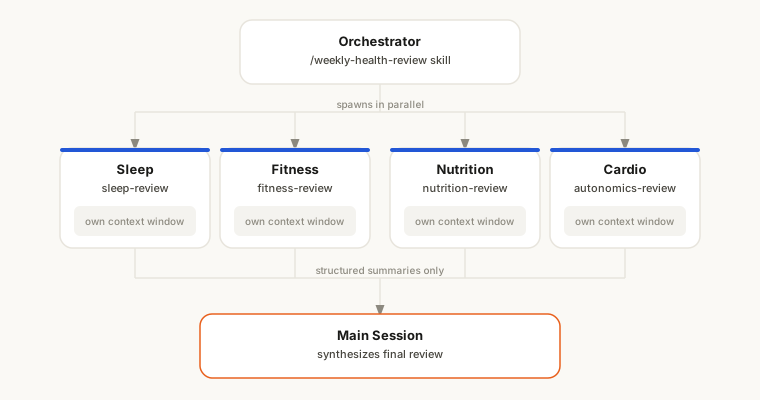
Four domain agents, each responsible for one slice of the data:
- Sleep & Recovery: nightly sleep architecture, therapy data, trends
- Fitness & Cardio: training volume by type, aerobic fitness trend, flagging gaps
- Nutrition & Metabolic: dietary averages, weight trend, logging coverage
- Cardiovascular & Autonomics: HRV, resting heart rate, blood pressure, anomaly detection
Each agent is a named type in a project-level plugin (health-tracker:sleep-review, health-tracker:fitness-review, etc.). They have their own system prompts with the database path, the Python queries, and the thresholds they’re responsible for reporting against. They know how to do their job without being told each time.
The weekly review skill /weekly-health-review is now just an orchestrator. It runs a quick preflight (check for unimported data, generate the scorecard), then spawns all four agents in a single message. They run in parallel and return structured summaries. The main session assembles the final review from those four inputs.
Why Parallel Matters
The speed argument is the obvious one. Each domain agent takes roughly 30–60 seconds to query the database, run its analysis, and format a summary. Sequential: four agents × ~45 seconds = three minutes of waiting. Parallel: ~45 seconds, total, regardless of how many agents run.
That’s a significant speedup on the analysis phase alone. At weekly cadence it adds up, but more importantly it changes the feel of the session. You get the full picture at once rather than watching it trickle in.
Why Context Management Matters More
Speed is the easy sell. The harder-to-see benefit is what stays out of the main context.
When each agent runs in its own context window, all of the intermediate work: raw query output, row-by-row database results, Python execution traces, stays there. The main session only receives the final structured summary from each agent. A few paragraphs of clean analysis per domain instead of pages of raw data.
That means the model is synthesizing from a clean, structured signal rather than trying to make sense of everything it did to produce that signal. On a single run, it’s a cleaner prompt and a more focused response. Across a session with follow-up questions and further analysis, the effect compounds.
There’s also a quality argument. When a model has too much in context, it can over-anchor on things that aren’t relevant to your current question. The analysis work in isolated subagent contexts means the main session never has to carry it.
Named Agents vs Inline Prompts
The first version of this used inline prompts. The weekly review skill embedded the full instructions for each agent directly in the skill file. That’s fine to start, but it creates a maintenance problem fast: one file with 300+ lines of embedded prompts is hard to update, and those prompts are only usable in that one context.
Named agents solve this cleanly. An agent is just a Markdown file in the project’s agents/ directory. The frontmatter defines its name and description; the body is its system prompt: the instructions it always carries when it runs.
.claude/plugins/health-tracker/
├── .claude-plugin/
│   └── plugin.json
└── agents/
    ├── sleep-review.md       → health-tracker:sleep-review
    ├── fitness-review.md     → health-tracker:fitness-review
    ├── nutrition-review.md   → health-tracker:nutrition-review
    └── autonomics-review.md  → health-tracker:autonomics-review
The file format is straightforward: frontmatter for the name, description, and optional model constraints, then the Markdown body that becomes the agent’s system prompt:
---
name: sleep-review
description: >
  Analyze sleep architecture and therapy data. Use this agent when asked
  about sleep quality, nightly trends, therapy compliance, or SpO2.
model: sonnet
color: cyan
---

You are the sleep analyst for [project]. Your job is to query the database,
analyze against the targets below, and return a structured summary...
Claude Code auto-discovers these and registers them as health-tracker:sleep-review, etc. No additional configuration.
The weekly review skill becomes a thin orchestrator. Phase 1 went from ~340 lines of embedded prompts to this:
Spawn all 4 in a single Agent tool message (parallel):

| subagent_type                    | prompt                              |
|----------------------------------|-------------------------------------|
| health-tracker:sleep-review      | "Run your weekly analysis."         |
| health-tracker:fitness-review    | "Run your weekly analysis."         |
| health-tracker:nutrition-review  | "Run your weekly analysis."         |
| health-tracker:autonomics-review | "Run your weekly analysis including anomaly detection." |
Each agent knows what to do. The orchestrator just fires them.
The Standalone Benefit
This is the part I didn’t fully appreciate until I built it. Named agents are invokable outside the weekly review. Mid-week I can say “run the sleep review agent” and get just that analysis. No full review, no other domains, no setup. The agent already knows the database path, the query patterns, the thresholds.
The inline prompt approach couldn’t do this cleanly. You’d have to copy the prompt out somewhere or re-derive the instructions. With named agents, each domain is a reusable capability. The weekly review is just one way to compose them.
When to Use This Pattern
Not every task benefits from subagents. The overhead of spawning and coordinating agents doesn’t pay off for simple, single-domain work.
The pattern earns its complexity when:
-
The work has natural domain boundaries. If you can draw a clean line between “this agent handles X” and “this agent handles Y” without either needing to know about the other, you have a parallel candidate.
-
Each domain produces verbose intermediate output. If the raw work of a domain (database queries, API calls, file processing) produces a lot of output that you’ll ultimately summarize anyway, that output belongs in a subagent context, not the main one.
-
You’ll want to run domains independently. If there’s any chance you’ll want to query one slice of the work without running everything, named agents are worth the extra structure.
-
The same analysis runs repeatedly. Weekly reviews, daily summaries, recurring reports. The setup cost of named agents amortizes fast when you’re running the same analysis every week.
For one-off tasks, a well-crafted inline prompt is almost always the right call. For recurring, multi-domain analysis, named agents running in parallel are worth building properly.
What Changed
The practical difference in my weekly reviews:
- Analysis phase: ~3 minutes → ~45 seconds
- Main context per review: significantly smaller. Raw query output, execution traces, and the agent system prompts all stay in subagent contexts
- Orchestrator skill file: 340 lines of embedded prompts → 8 lines
- Standalone invocability: not possible → any domain, any time
The architecture took a few hours to set up properly. It’s paid back that time many times over.
Most tutorials on agents stop at “run tasks in parallel.” That’s the first chapter. The second is treating context as a resource you actively manage: deciding what belongs in the main session and what belongs isolated in a subagent, designing your analysis so intermediate noise never reaches the window that needs to stay clean.
When you build with that constraint in mind, you get faster sessions, lower costs, and work that scales to longer runs without hitting limits early. The speed was always the obvious win. This is the durable one.
I write about building with AI and the Salesforce platform. Follow along on LinkedIn.
Share on LinkedIn